Cross platform encounters 1/2
Porting my Android app to Windows Phone
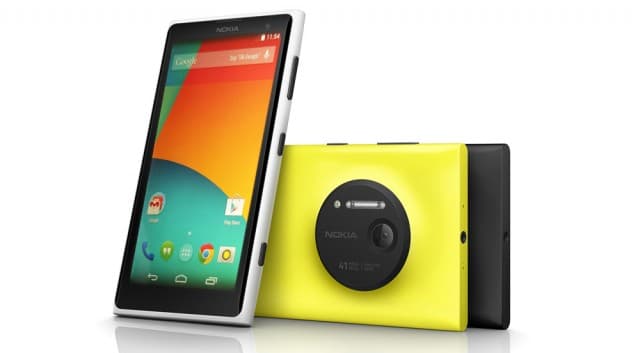
Way back year 2015 when I learned to develop android applications, life was easy that you didn't have much to stress about back then. Coming from being an amateur in PHP, Java didn't have much friendliness to offer me in any way. I had to hit the ground running as I had done with PHP a year or two back.
In my ICT course back then examined by KNEC, the ancestor of all examination bodies, we learned C, C++, Pascal, ASP.Net, HTML, CSS, JavaScript scopes that only allowed us to pass the exams but not to be entrepreneurs in the market once we graduated. If we were to use that programming knowledge to write software to land a space shuttle on Mars I doubt if the shuttle would even manage to get the right trajectory to enter Mars if it managed to take off with the right speed to overcome earth's gravity.
So into android programming back then all that one needed was Eclipse and ADT plugin to do an android app and having internet was not a requirement once you had all these tools in place. Provided you didn't use the emulator that came with the ADT plugin you were good to go in developing an android app. As much as Android Studio was introduced way back in 2013 as the official IDE for android it was until somewhere in 2018 that I was able to start testing it out on a borrowed laptop. AS was a memory hog just like Chrome and somewhere from 2018 to 2019 my laptop had roasted its motherboard while building on AS.
Well if you can remember during the years 2015 to 2017 we had several people with Windows Phones, a phone that had a difficult UI for users coming from Android. I began getting pressure from users with that phone to make my already doing well android app available on their OS. This was not an easy task to commit into bearing in mind it needed a different IDE installed and another language was what would be the fuel.
As usual, when confronted with a hard technical decision I always went to Miss. Google for she had a thousand and one answers even before I finished asking. Whereas Java is a class-based Object Oriented language, C# is Object-Oriented, functional, strong typing, component-oriented. Java doesn't support operator overloading whereas C# provides operator overloading for multiple operators. Java does not support pointers while C# supports pointer only in an unsafe mode. It was easier to say in a layman's language that Java and C# are cousins if not brothers. A few struggles I had in Java would be no more in C#.
THE CHANGE OVER I gave myself a go-ahead and ventured into new waters which I would later struggle to get their depth. Armed with OOP concepts from school and a few apps on Github I started to port my android app to Windows Phone a.k.a Winfon. I installed Visual Studio 2013 Community Edition which came with an emulator and Windows Phone 7 SDK. Whereas on android I dealt with xml files for the designer files, on winfon I worked with xaml (pronounced as zamel) files.
The code-behind file was written in .xaml.cs files. The XAML file (.xaml) and the corresponding code-behind file (.xaml.cs) are two partial definitions of the same class. The InitializeComponent() method that is called in the constructor of the code-behind class at runtime locates a URI to the compiled XAML file and passes it to a LoadComponent() method that parses the BAML, i.e. the compiled XAML, and creates instances of the elements that you have defined in the XAML markup.
Moving forward I would say the Windows Phone emulator was pretty much lightweight from booting to even debugging the app. Don't forget Visual Studio was also quick at building iap same as apk for android. I later installed Visual Studio 2015 and migrated to Windows Phone 8.1 SDK where amazing things were happening at that time looking at the tutorials and code samples online. I also bought myself a new Nokia 5.1 which came with Windows Phone 8.1 SDK.
Windows Phone development started to feel a lot easier than Android development. This was because there was less fragmentation on the Windows Phone side compared to Android due to phone hardware optimization boundaries. Then there was a more rich set of development tools from Microsoft and third-party, something Android lacked. The only plus side android development had at that time was that it was open-source otherwise on everything else, Windows Phone beat it all.
THE STRUGGLES Building basic UI components like lists, context menus, action buttons, sliders, and basic navigation to a screen and back were much easier than I had expected. The catch came when I needed to:
Integrate an offline database to my app like I had been doing on Android.
Run background activities
Provide real-time search on items from the database
I will not be able to say how I overcame much of the challenges away from scantly sample codes and premium user controls but let just say I figured it out as always. You can see from the Github repo I didn't quite well understand how to do versioning some 5 years ago.
Unlike on Google where buying a developer account was pretty much straightforward, on Microsoft the father of Windows Phone I struggled with the process for a long time like almost a month or two. I had issues with my credit card because I was using a credit card by Cooperative Bank and they were having a problem allowing transactions below $ 1. On the other end, Microsoft needed to charge my card the amount to check if it was a valid one.


